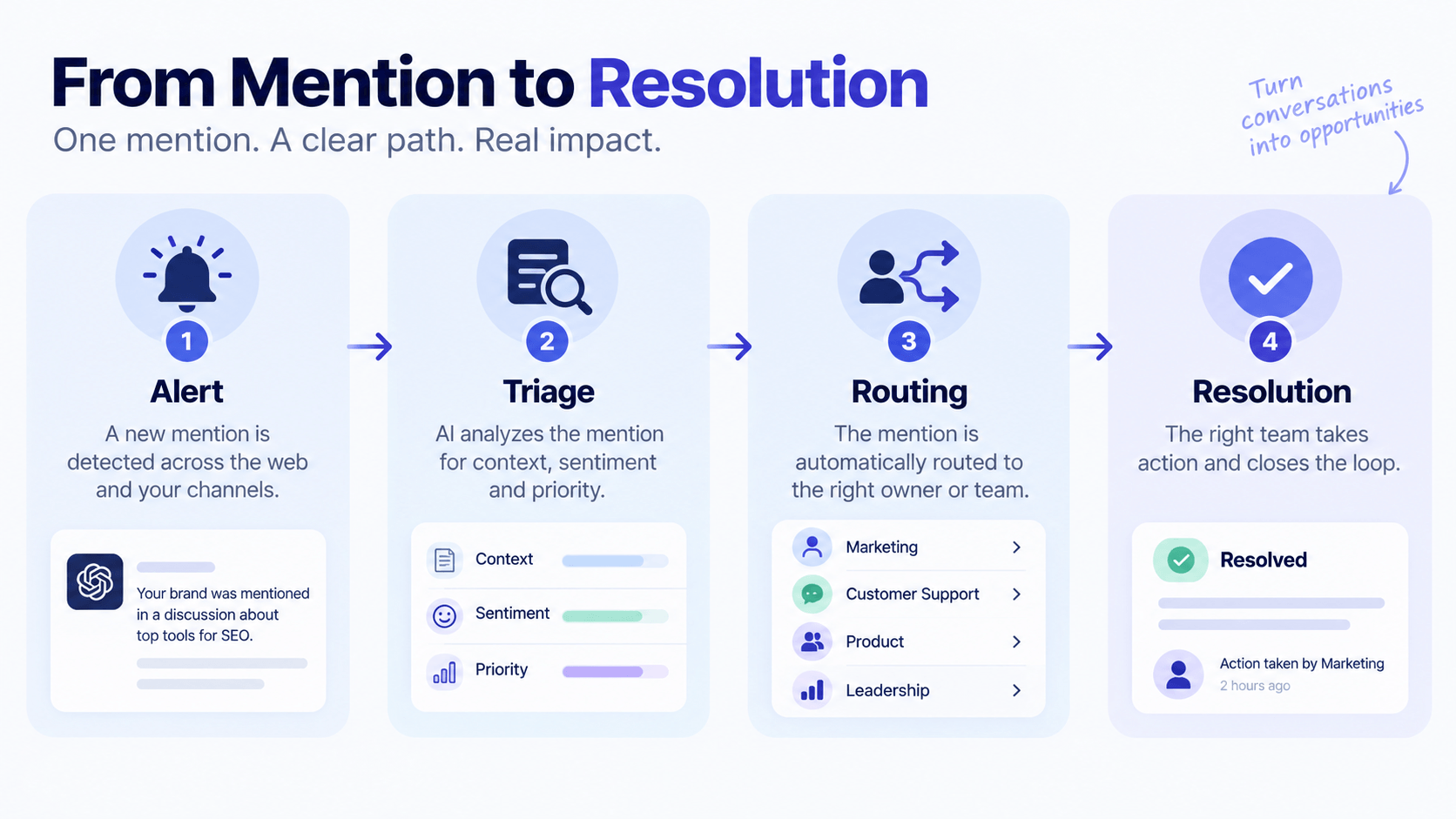
A tool generates an alert. What happens in the next ten minutes is the actual workflow, and most teams never design it on purpose. Mentions pile up in a shared inbox nobody checks on a fixed schedule, urgent ones sit next to routine ones with no way to tell them apart, and the person who should respond finds out an hour after someone else already did, or nobody did at all. This guide covers the specific mechanics of a working social listening workflow: how a mention moves from alert to triage to routing to resolution, the escalation tiers that keep urgent things from getting lost in routine volume, and the tooling that carries a mention from your listening platform into the channel where your team actually works.
- A workflow needs three tiers, not one inbox. Routine, elevated, and critical mentions need different routing, different response windows, and different owners, or urgent items get buried under routine volume.
- Consumers expect a fast response during a live issue. Roughly a one-hour response window, and the narrative window before your side of the story gets written for you runs about two hours.
- Mentions belong where your team already works. A listening tool that only lives in its own dashboard gets checked less and less over time. Routing alerts into Slack or your ticketing system keeps the workflow inside the habits your team already has.
- Pre-built response templates save the minutes that matter most. Drafting a reply from scratch during a live issue costs time you do not have. A short library of approved starting points, edited for the moment, beats a blank text box every time.
- Coverage gaps are a workflow problem, not a tooling problem. A three-tier alert system with no after-hours or weekend coverage plan still leaves your riskiest hours unwatched, regardless of how good the software is.
What a workflow is, and why a dashboard is not one
A social listening tool collects mentions. A workflow decides what happens to each one after it arrives, and that second part is where most teams have nothing written down. If you asked five people on your team what happens when a negative mention comes in at 6pm on a Friday, you would likely get five different answers, or a shrug. That gap is the workflow problem this guide solves.
This is a different question from the ones our other guides answer. If you have not yet gotten a listening program approved and staffed, start with our guide on setting up a program, which covers ownership, budget, and the thirty-day rollout. If you already have a program running but want the query and metric fundamentals, our guide on building a listening strategy covers that layer. This guide assumes both exist already, and focuses purely on the operating mechanics: what happens between an alert firing and someone on your team actually doing something with it.
Build your three triage tiers
Every mention that enters your system needs a tier assigned within minutes of arriving, and the fastest way to get this wrong is treating every mention with the same urgency. A three-tier structure covers nearly every situation we have built a workflow around.
| Tier | What triggers it | Target response window |
|---|---|---|
| Routine | Normal-volume brand mentions, neutral or mildly positive tone, standard questions | Within one business day |
| Elevated | A single sharp negative mention, a recurring product complaint, an account with meaningful reach | Within two to four hours |
| Critical | A volume spike, a sentiment reversal, language suggesting a safety or trust issue | Within one hour, immediate for anything safety-related |
The threshold that separates elevated from critical is the one worth spending the most time defining, since it is the line that decides whether a mention wakes someone up. Write specific examples into the tier definitions rather than leaving them abstract. "A complaint about shipping delays" reads differently from "language suggesting a product caused harm," and your team needs to sort those instantly without pausing to debate which bucket a mention belongs in.
Map the escalation matrix
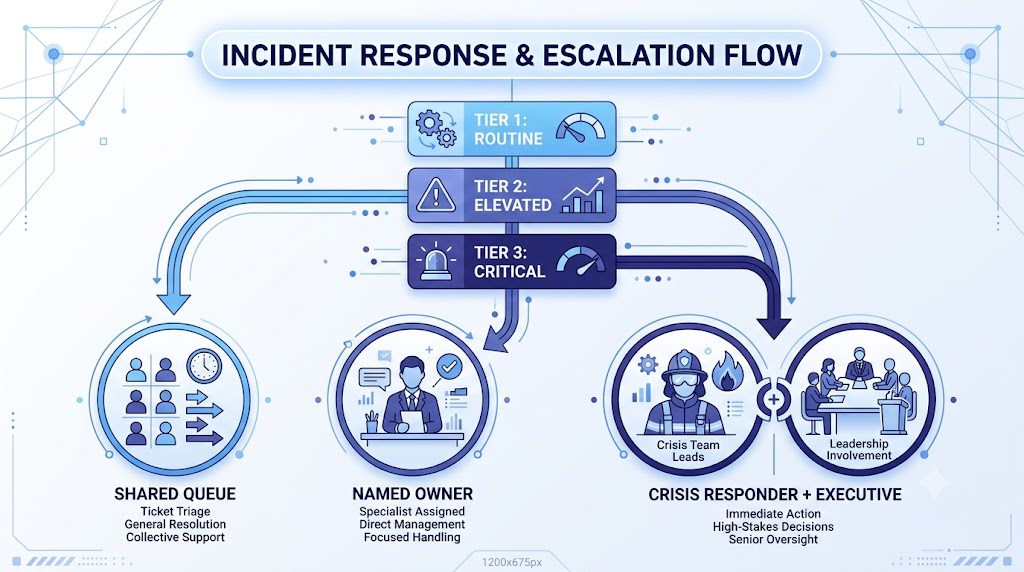
A tier is only useful once it points somewhere specific. Routine mentions can sit in a shared queue that gets cleared once a day. Elevated mentions need a named owner who gets a direct notification, rather than a spot in the same queue with a different color tag. Critical mentions need a defined chain: who gets notified first, who they loop in next if the first person does not respond within a set window, and at what point an executive gets pulled in.
Write the chain down with actual names and a backup for each name, since the person your matrix names as the first responder will eventually be on a plane or in a meeting when something critical comes in. A workflow that only works when the right person happens to be at their desk is not a workflow, it is a hope. If you want the deeper playbook for handling an issue once it clears the critical threshold, our guide on handling a brand crisis covers the response itself in more depth than we will here.
The stakes for getting this right keep climbing. Roughly a one-hour expectation window, and industry benchmarks put the real narrative window, the stretch before the public conversation settles into a fixed story, at roughly two hours. An escalation matrix with unclear ownership eats into that window before anyone has even started drafting a response.
Connect listening to where your team works
A listening dashboard that lives in its own tab gets checked less every week that passes, simply because it is one more place to remember to look. The fix is routing alerts into tools your team already has open. Two integrations cover most setups: a Slack or Teams channel for real-time visibility, and a ticketing system for anything that needs a formal owner, a due date, and a closed status.
Configure the routing by tier rather than sending everything everywhere. Routine mentions can post to a low-priority channel that gets scanned once a day. Elevated mentions should create a ticket automatically, assigned to the named owner from your escalation matrix, with the original mention linked so nobody has to hunt for context. Critical mentions should trigger a direct notification, not a channel post that can scroll past unnoticed, since a message in a busy Slack channel is exactly the kind of thing that gets missed during the ten minutes that matter most.
This is also where purpose-built brand monitoring tends to outperform a general social suite bolted onto a listening add-on, since the routing logic is built around getting a mention to a person and a deadline, rather than around scheduling content. Test the actual routing path before you trust it, beyond confirming the alert itself fires. Send a deliberate test mention through each tier and confirm it lands where it should, with the right person notified in the way you expect. Teams watching high-signal sources like Reddit conversations tend to see this routing tested the most, since that is often where an elevated-tier thread first appears.
Build a response template library
Drafting language from a blank text box during a live issue costs time you do not have, and it is also where inconsistent tone creeps in when different people respond to similar situations differently. A short library of pre-approved starting points fixes both problems at once.
Build templates for the five or six situations that come up most often: a routine product question, a shipping or billing complaint, a request to take a conversation to a private channel, an acknowledgment for something under active investigation, and a holding statement for anything that has cleared the critical threshold but is not yet fully understood. Each template should be short enough to personalize in under a minute, since a response that reads as obviously copy-pasted does more damage than no response at all.
Review the library every quarter alongside your query taxonomy. Language that felt right a year ago can read as stiff or out of step with how the brand talks now, and a stale template library is one of the quieter ways a workflow starts to feel like it is fighting the team instead of helping it.
The response timeline that holds up under pressure is roughly fifteen minutes to acknowledge, an hour to respond, and regular updates after that until the issue closes. A template does not replace judgment. It buys back the minutes judgment needs.
Set coverage hours and a daily rhythm
A workflow with three tiers and a clean escalation matrix still fails if nobody is watching at 2am on a Saturday. Coverage is a deliberate decision, not a default, and the right answer depends on how much of your critical-tier risk actually happens outside business hours. A B2B software company with mostly weekday traffic has a very different coverage need than a consumer brand with a global audience posting around the clock.
Three coverage models cover most teams. Business-hours-only works for low-risk brands where a critical mention overnight can reasonably wait until morning. An on-call rotation, where one person carries a phone for critical-tier alerts outside business hours, fits most mid-size teams and does not require round-the-clock staffing. Full follow-the-sun coverage, where a team in a different time zone picks up after hours, is usually reserved for larger teams or industries where an overnight gap carries real risk. Agencies managing several clients often land on the on-call model by default, since it scales across accounts without needing a dedicated overnight team for each one.
Whichever model you choose, pair it with a fixed daily rhythm. A short daily standup, even five minutes, where the routine queue gets reviewed and anything elevated from the last 24 hours gets a status update, keeps the workflow from becoming something that only gets attention when it breaks. Save the deeper weekly or monthly pattern review, covered in our strategy guide, for a separate slower-paced session. The daily rhythm and the analytical review serve different purposes and should not be squeezed into the same meeting.
Putting the full workflow together
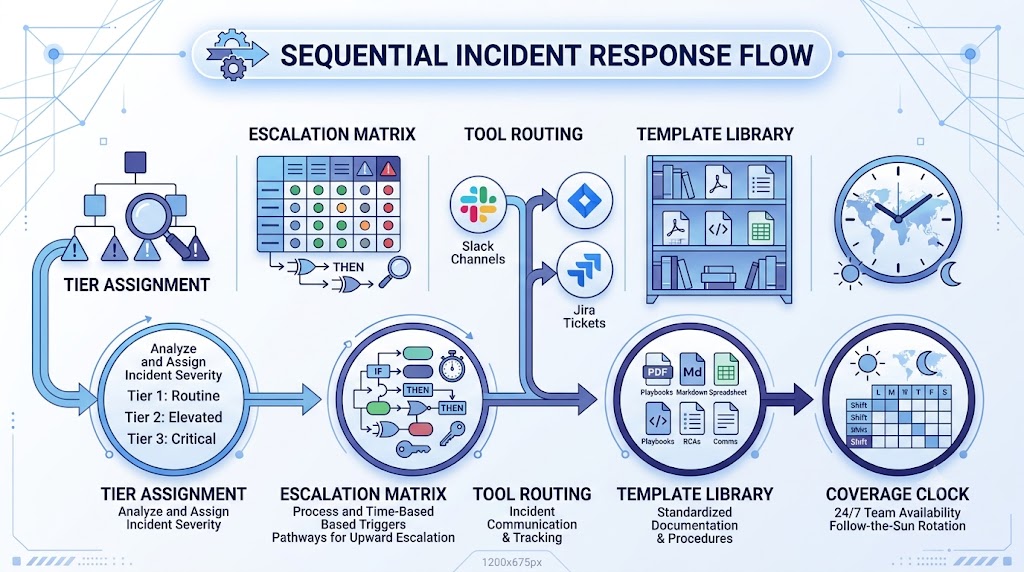
A complete workflow has five pieces working together: the tier assignment that sorts a mention the moment it arrives, the escalation matrix that gives each tier a named destination, the tool routing that carries the mention into Slack or a ticket rather than a dashboard nobody opens, the template library that gets a response out fast without sacrificing tone, and the coverage plan that makes sure someone is actually watching during the hours that matter most.
Test the whole chain before you trust it in production. Pick a quiet week, run a few deliberate test mentions through each tier, and time how long it takes for the right person to see it and respond. If the elevated tier takes six hours to reach anyone, the matrix is broken regardless of how clean it looks on paper. Fix the gaps you find before the workflow gets tested for real, on a day when the mention is not a drill. If you are still weighing which listening tool to build this workflow on top of, our free AI visibility audit is a quick way to confirm your brand is actually discoverable across the sources you are about to wire into it.
Frequently asked questions
How many people does a social listening workflow need?
A small team can run a full three-tier workflow with two or three people, as long as each named role in the escalation matrix has a backup. What matters more than headcount is that every tier has a specific person attached to it, not a shared inbox that everyone assumes someone else is checking. Larger teams add more owners per tier, but the underlying structure stays the same.
What is the difference between a triage tier and an escalation matrix?
The tier sorts a mention by urgency: routine, elevated, or critical. The escalation matrix decides what happens next for each tier, specifically who gets notified first, who they loop in if that person does not respond in time, and at what point an executive gets pulled into a critical situation. You need both. A tier with no matrix behind it just labels the mention without routing it anywhere.
Should social listening alerts go to Slack or to a ticketing system?
Both, routed by tier. Slack or Teams works well for real-time visibility on routine and critical mentions, since the whole team can see activity as it happens. A ticketing system works better for elevated mentions that need a formal owner, a due date, and a closed status, since a Slack message can scroll past and get forgotten in a way a ticket sitting in an open queue cannot.
Do small teams need after-hours coverage?
It depends on your risk profile more than your headcount. A B2B software company with a mostly weekday, mostly domestic audience can often get away with business-hours-only coverage and accept that critical mentions overnight wait until morning, since the practical cost of a delayed response tends to be low when your buyers are not browsing at 2am anyway. A consumer brand with a global, always-on audience usually needs at least a lightweight on-call rotation, since the two-hour narrative window that shapes public perception during a crisis does not pause for time zones, and a product issue that starts trending overnight in one region can be a fully formed story by the time a business-hours team logs on. The middle ground many small teams land on is a single on-call phone that rotates weekly among two or three people, which costs far less than full follow-the-sun staffing while still closing the biggest gap: the hours when nobody is watching at all.
How often should response templates be updated?
Review the template library every quarter, alongside your query taxonomy and tier thresholds. Templates go stale in two ways: the language starts reading as out of step with how the brand actually talks, or new situations come up often enough that they deserve their own template instead of getting force-fit into an existing one. A template nobody has touched in a year is usually a template nobody trusts enough to use.
A social listening tool tells you what people are saying. A workflow is the part that turns that into something your team actually does something about, consistently, without depending on one person remembering to check a dashboard. Build the tiers, name the escalation chain with real people and real backups, route alerts into the tools your team already lives in, and test the whole chain before a real mention forces you to find the gaps the hard way.
Route mentions to the right person automatically
Mentient tracks mentions across Reddit, the web, and AI answers, and routes alerts by tier so the right person on your team sees them at the right speed. Start free and wire up your first workflow today.
Start free trial